

Launch: Catsup
My wife has been using Apple Reminders for our grocery list. It works, but when you check off eggs for the 10th time and add it back for the 11th time the next week, it feels like a hassle. And if you want to find something in the completed items, you have to scroll through eggs, bread, eggs, bread, orangutan, eggs, bread… So she tried to work around it by not checking off the items, which made the app even messier.
I think a grocery app should be designed differently from a todo list app. Forever ago, I saw this physical grocery list on Reddit, supposedly from the 1950s. And I was like, that’s it. That’s how a grocery list should work. I tried to get other developers to build it by offering it as a free idea. But nobody took it. So fine, I’ll do it myself.
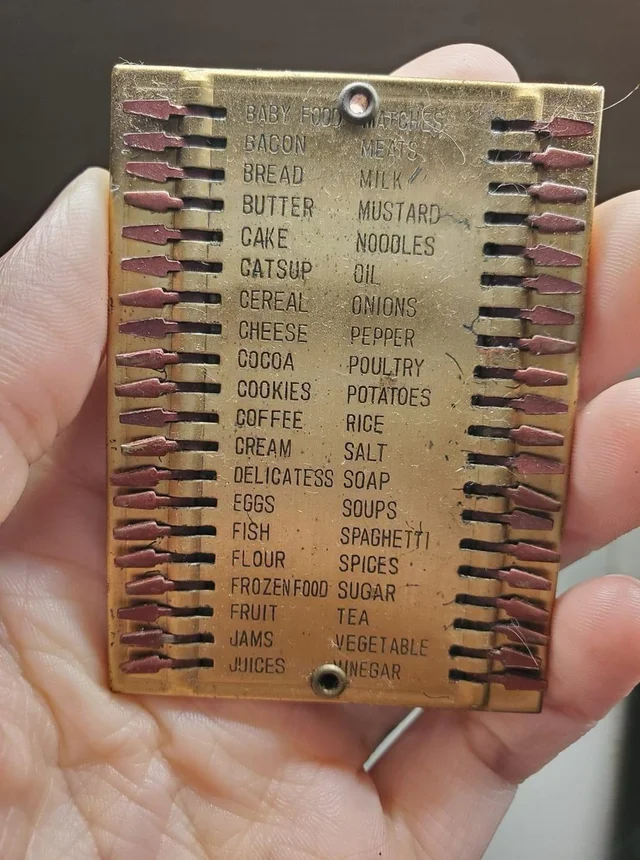
I looked through the item list in the photo. Wait, something’s not right. Enhance. Enhance. What is “catsup”? Turns out it’s just how your grandparents spelled ketchup. I thought okay, I have to name my app Catsup now. Then I drew a very accurate app icon using only the brush tool in like 10 minutes. Then… I spent another week making the UI match the style of the icon. I even created a custom font. This is why you shouldn’t let me near projects with deadlines.
The whole point of the app is that you don’t want bought items to disappear. You want to slide a knob, go buy bread, then slide the knob back. Do you remember how in the original iPhone keynote, Steve Jobs called apps like Stocks and Weather “widgets”? Catsup is a widget. You can swipe between lists like how you swipe between cities in the Weather app. You can only have at most 3 lists with 40 slots each. Because 120 slots ought to be enough for anybody.
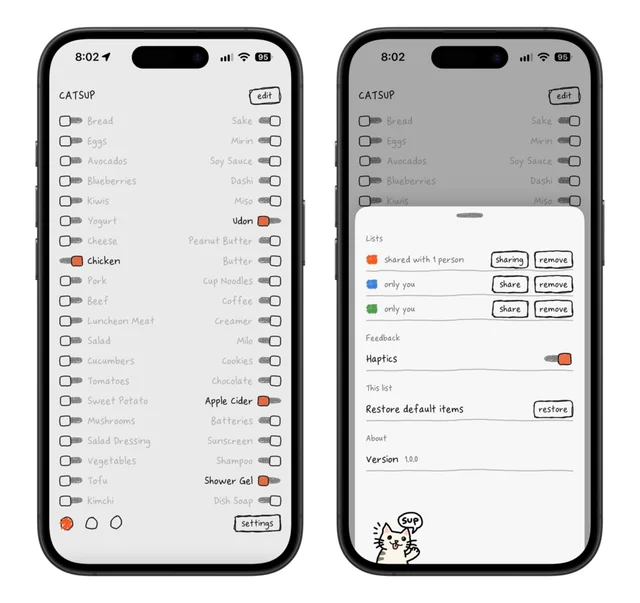
The only other feature I wanted was iCloud sharing, so there is iCloud sharing.
There are no categories. If you want to organize the items, just put similar items together. I think spatial memory and muscle memory work better than telling you that an apple is a fruit. I have my commonly bought items on the top left, healthy food on the bottom left, Japanese cooking ingredients on the top right. These days I don’t really need to read the list anymore.
You can’t attach photos. And the item names are limited to 16 characters. I mean I’ve been buying the same brand of peanut butter for 20 years. I don’t need a photo of it or the full name. There are also no notifications, because I take my phone out in the supermarket.
Catsup Privacy Policy
Catsup doesn’t collect, store, or transmit any personal information.
Catsup Pricing
Catsup is available for $3.99 on the App Store. There are no subscriptions, in-app purchases, ads, or tracking. Requires iOS 18+.
If you think about it, everything in your grocery list is probably more expensive than this app.
Catsup Support
If you have any questions, feel free to contact me via email or Mastodon. I read all my emails and Mastodon mentions, but sometimes I’m too socially awkward to reply. Sorry about that in advance.